
Upgradey iPhone Upgrade Decision Calculator
“Should I upgrade or wait?”
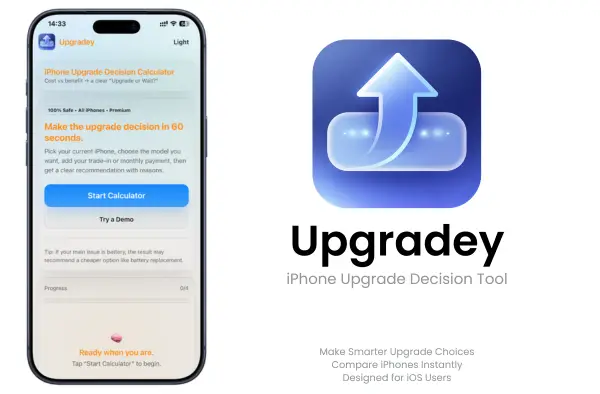
Know if upgrading now is worth it — or if waiting is the smarter move.
Check trade-in value, battery health, upgrade cost, and real everyday benefit in one clear decision tool for iPhone users.
What Upgradey Does (Quick Summary)
Upgradey is an iPhone upgrade decision tool that helps you compare your current iPhone vs the model you want—without turning it into a spec marathon.
- Gives a clear “Upgrade / Wait / Maybe” result in minutes
- Balances iPhone upgrade cost vs benefit (not just specs)
- Shows a simple iPhone upgrade value calculator style breakdown
- Helps you compare current iPhone vs new iPhone with real-life inputs
- Creates a result you can copy summary, save result, and run another comparison anytime
If you’re choosing between models, financing options, or timing, Upgradey keeps the decision clean.
Should You Upgrade Your iPhone or Wait?
A newer iPhone does not always mean a better decision.
Sometimes your current phone still does everything you need. Sometimes the battery is the real issue. Sometimes trade-in value makes the upgrade more attractive. And sometimes the monthly payment looks easy until the total cost stops feeling worth it.
That is where Upgradey helps
It is built for people who want a clearer answer before spending real money. Instead of pushing every user toward an upgrade, Upgradey helps you weigh cost, benefit, and timing more honestly.
This is not just another comparison page. It is a practical upgrade decision tool for iPhone users.
What Upgradey Does
Upgradey turns upgrade uncertainty into a clearer decision.
What you get
- Upgrade / Wait / Maybe result
- Benefit score
- Cost score
- Value score
- Plain-language reasons behind the result
- A cleaner view of whether upgrading makes sense for your situation
Best for
- Deciding whether this year’s iPhone upgrade is worth it
- Comparing trade-in value against real everyday benefit
- Judging whether monthly payments feel worth it
- Knowing when battery replacement is smarter than upgrading
- Choosing between upgrading now or waiting one more cycle
What the Results Mean
Upgradey is designed to give you a decision you can actually use.
👉 Upgrade
This result means the upgrade looks worthwhile based on your current phone, expected improvement, and overall cost-to-benefit balance.
👉 Wait
This result means your current iPhone may still make more sense for now, especially if the upgrade benefit is small compared with the cost.
👉 Maybe
This result usually means the decision depends on a few key details, such as trade-in value, battery condition, budget comfort, or whether waiting could improve the value.
👉 Benefit score
This helps show how much practical improvement the new iPhone may actually bring to your daily use.
👉 Cost score
This helps show how heavy the upgrade feels financially based on the details you entered.
👉 Value score
This gives a clearer view of whether the upgrade feels justified overall.
👉 Why this result matters
The goal is not just to give you a score. The goal is to help you understand whether the upgrade is actually worth it for you.
Download Upgradey — iPhone Upgrade Decision Calculator
Stop guessing and get a clear Upgrade or Wait result in minutes. Install the Upgradey app inside the iPrimer productivity appstore, enter your current iPhone, your next model idea, and your budget, then get a clean report with the reasons behind the decision.
• No subscriptions • No jailbreak • No PC • Fast & easy installation
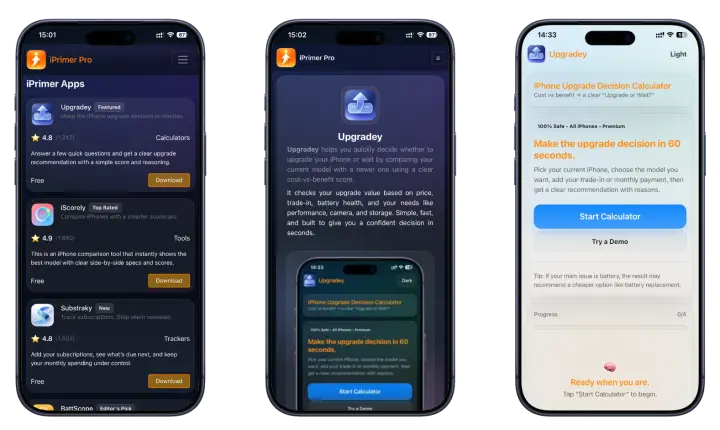
Download iPrimer to access Upgradey and run your first upgrade check now.
Get Upgradey Through iPrimer (Install Path)
Upgradey is included inside iPrimer, so you get more than just upgrade decision support.
What else you get inside iPrimer
👉 BattScope — Battery Health Analyzer
Check whether your iPhone battery is still worth keeping or whether replacement planning makes more sense.
👉 Substraky — Subscription Tracker
Track subscriptions, renewal dates, and monthly totals without linking sensitive financial details.
👉 iScorely — iPhone Comparison Tool
Compare iPhones by value, battery, camera, and more without getting lost in spec overload.
How to download and install (No PC)
- Download iPrimer to access Upgradey
- Install and open iPrimer appstore
- Select and install Upgradey app
- Start the upgrade calculator and get your Upgrade/Wait result
This is a no PC install flow and does not require jailbreak. If you want the simplest route to install Upgradey on iPhone, this is it.
Upgradey Compatibility 2026
- Compatible with iOS 26 – iOS 26.4
- Compatible with iOS 17 / iOS 18 (supported devices)
- Works on all iPhone and iPad models (only check iPhone models)
How Upgradey Works (4-Steps)
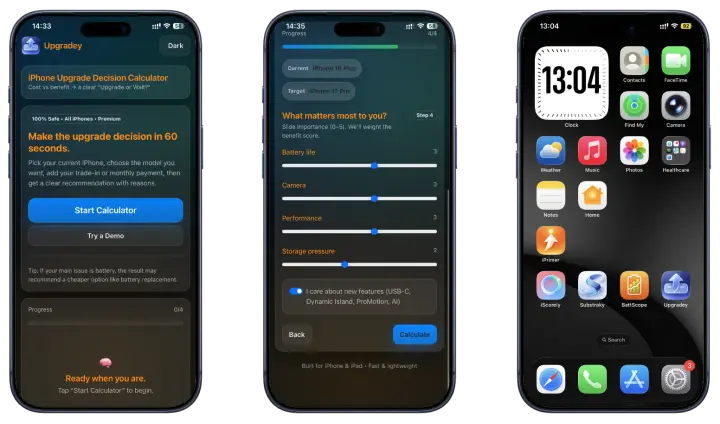
Upgradey uses a short flow that matches how real people buy iPhones in the world: what you have, what you want, what it costs, and what matters most.
Step 1 — Your current iPhone
Start with your current phone basics. This is where Upgradey becomes more than a generic iPhone upgrade calculator.
- Current iPhone model
- Condition
- Battery health percentage
This step matters because battery health changes the whole story.
If your battery is worn down, Upgradey can help you see whether an upgrade is truly worth it—or whether a cheaper fix makes more sense.
Common searches this step answers naturally:
- iPhone upgrade based on battery health
- iPhone upgrade calculator based on battery health percentaget
- should I upgrade if battery health is 80% / 75% / 70%
Step 2 — The iPhone you want
Choose the iPhone you’re considering and the timing.
- Target iPhone model
- Buying now vs waiting
- Quick upgrades preview (the changes you’ll actually get)
This step is built for people who keep asking:
“Should I upgrade my iPhone? Compare models first.”
Upgradey helps you compare your current iPhone vs new iPhone upgrade path without making you read 20 tabs.
Helpful intent coverage:
- compare current iPhone vs new iPhone upgrade
- should I upgrade my iPhone compare models
- Pro vs Plus upgrade decision (generic guidance)
Step 3 — Cost details
This is the part most comparison pages ignore. Upgradey treats cost like it should be treated: realistically.
- New iPhone price
- Trade-in / resale estimate
- Monthly payment (optional)
- Payment type (finance vs pay in full)
- Finance months (ex: 24 or 36) + budget comfort
This is what makes Upgradey feel like a real iPhone trade-in vs upgrade calculator.
Because the “best phone” isn’t always the best decision if the cost doesn’t match the benefit.
Step 4 — What matters most to you
Not everyone upgrades for the same reason, so Upgradey lets you weight your priorities.
Set your importance (0–5) for things like:
- Battery life
- Camera
- Performance
- Storage pressure
Optional: “I care about new features” (like display upgrades)
This is where Upgradey becomes your upgrade decision maker not a generic recommendation tool.
If you care about battery-first, camera-first, or value-first decisions, it weighs the benefit score accordingly.
Your Result (Upgrade / Wait / Maybe)?
When you finish the calculator, Upgradey gives you an upgrade or wait result that’s easy to understand—and easy to trust. You don’t just get a label. You get the why.
The decision: Upgrade / Wait / Maybe
- Upgrade means the benefit is strong enough to justify the cost.
- Wait means the cost outweighs what you’ll realistically gain right now.
- Maybe means there are meaningful upgrades, but the pricing or timing may not be worth it yet.
Score breakdown (clear, not confusing)
Upgradey shows a simple score view so you can gauge the decision quickly:
- Benefit score — how much you gain based on your priorities
- Cost score (lower is better) — how heavy the upgrade cost feels after trade-in/financing
- Value score — the overall “is this worth it?” signal
This is what makes Upgradey feel like an iPhone upgrade calculator with benefit score and an iPhone upgrade calculator with value score, not just another spec comparison.
“Why this result”
Upgradey also includes a “why this result” section—plain language reasons tied to your inputs, such as battery health, cost after trade-in, monthly payment comfort, and the upgrades you weighted most.
That’s what turns it into an iPhone upgrade tips with reasons, not a generic suggestion.
Compare Scenarios
These are the situations most people are actually in. If one matches you, Upgradey tends to feel instantly useful.
👉 Battery replacement vs upgrading
If your phone feels “old,” battery health is often the hidden reason.
Upgradey helps you judge whether replacing the battery is the smarter move, or whether an upgrade gives enough real benefit.
👉 Finance vs pay in full
Some upgrades look cheap monthly, but expensive in total. Others are worth it because the cost is comfortable and the benefit is high.
Upgradey makes this comparison simple by weighing monthly payment vs pay in full against the benefit you’ll actually feel.
👉 Buy now vs wait
Timing changes everything. Buying now might make sense if your current phone is struggling, but waiting can be smarter if the value isn’t there yet.
Upgradey acts like an iPhone upgrade timing calculator by considering your timing choice and cost inputs in the result.
Pro features worth it?
Many people upgrade because of one “headline feature,” then realize they barely notice it. Upgradey helps avoid that by weighting what you care about.
If you care about smoother scrolling, new ports, or pro-level upgrades, you can test the decision before spending.
When Upgradey Is Most Useful
1. Your battery is falling and you are not sure what to do
Sometimes the real question is whether your battery needs help or whether your whole phone is ready to be replaced.
2. You are tempted by a new iPhone, but the cost feels high
Upgradey helps bring the cost side back into the decision.
3. You want to compare trade-in value with real benefit
Trade-in offers can look attractive, but Upgradey helps you decide whether the upgrade still makes sense overall.
4. You are deciding between upgrading now or waiting one more cycle
This is one of the most common upgrade questions, and one of the easiest places to overspend without enough clarity.
Battery Replacement or New iPhone?
This is one of the biggest iPhone decisions people make.
When battery replacement usually makes more sense
Battery replacement may be the better move when:
- your current iPhone still fits your daily needs
- battery life is the main problem
- the rest of the phone still feels worth keeping
- spending less now gives you better value overall
When upgrading is the smarter move
Upgrading may make more sense when:
- your battery is worn down and other limitations are piling up
- your current phone no longer fits your daily use
- repair cost no longer feels worth it
- the new phone offers improvements you will genuinely use
How Upgradey helps
Upgradey helps you think through battery condition, overall value, and the real cost of upgrading so the decision feels less random.
Finance, Trade-In, and Real Upgrade Cost
Upgrade decisions are not just about features. They are also about money.
👉 Why monthly payments can hide the real cost
A low monthly number can make an upgrade feel easier than it really is. Upgradey helps put the full decision into context.
👉 How trade-in changes the decision
Trade-in value can make upgrading more attractive, but it should still be weighed against what you are actually gaining.
👉 Why comfort level matters, not just price
Even when you can afford an upgrade, it may still not feel like the best value right now.
👉 How Upgradey keeps cost vs benefit practical
The goal is to help you decide whether the upgrade feels worth it, not just technically possible.
Why You Can Trust Upgradey
Trust matters when the page is helping users make a real spending decision.
👉 Built around the way real people buy iPhones
Upgradey focuses on the practical things people actually think about before upgrading: cost, battery, trade-in, timing, and value.
👉 Uses your inputs, not generic hype
The result is based on your situation, not just broad claims about the newest model.
👉 Designed to explain the decision, not force it
Upgradey is not built to push every user toward “upgrade now.” It is built to give a clearer answer.
👉 Clear scoring with plain-language reasoning
The scores are there to support the decision, but the most important part is the explanation behind the result.
👉 Privacy, safety, and user control
Upgradey is designed to stay simple, user-focused, and practical.
Who Upgradey Is For
Upgradey is an iPhone upgrade helper for people who want a clean answer before spending real money.
- You’re deciding whether to upgrade this year and want a clear “Upgrade or Wait?” result
- You use trade-in and want the real cost after trade-in (not guesses)
- You pay monthly and want to know if the payment matches the benefit
- You care about value and want the best decision per money
- You want a simple tool for budget comfort, because you don’t want to waste money
If that sounds like you, Upgradey is built to help you decide fast and feel good about the decision later.
Upgradey Key Features 2026
Upgradey is an iPhone upgrade decision calculator app built for real buying moments, when cost, trade-in, and timing matter more than perfect spec sheets.
- Cost vs benefit, clearly
Upgradey works like an iPhone upgrade calculator cost vs benefit, so you can see if the upgrade is worth the money, not just “newer.” - Cost inputs
Add the details people actually use in the world: trade-in/resale, monthly payment, finance months, and your comfort level. - Budget comfort check
Not everyone wants the same monthly payment. Upgradey helps you judge the upgrade based on what feels affordable to you. - Slider weights (your priorities)
Choose what matters most: battery, camera, performance, or storage, so your result matches your real use. - Copy summary (save the decision)
Get an iPhone upgrade report you can copy and keep. Perfect for comparing later or sharing with family before you buy. - Try another comparison in seconds
Change one thing (model, trade-in, monthly payment) and run it again. This is how you find the best value path fast.
Safety, Privacy & Your Control
Upgradey is built to be simple, respectful, and safe.
- No personal data collection or sharing. We don’t collect, sell, or share your personal details—guaranteed.
- No system changes. Upgradey does not modify iPhone or iPad system settings or system files.
- Safe install and uninstall. You can install and remove Upgradey (via iPrimer) anytime using standard device steps.
Upgradey FAQ 2026
1. Should I upgrade my iPhone or wait?
Use Upgradey when you want a clear answer without guessing. It weighs benefit vs cost using your inputs (current model, target model, trade-in, budget comfort, and priorities) and returns an Upgrade/Wait/Maybe result with reasons.
2. Is it worth upgrading my iPhone this year?
It’s worth it when the improvements match what you care about most (battery, camera, speed, storage) and the real cost after trade-in or monthly payment still feels comfortable. Upgradey helps you check that quickly instead of relying on hype.
3. How does Upgradey calculate cost vs benefit?
Upgradey compares what you’ll gain (benefit score) against what you’ll pay (cost score after trade-in/financing). Then it combines them into a value score and shows a simple “why this result” explanation tied to your inputs.
4. Can I include trade-in value?
Yes. You can include trade-in or resale value so your upgrade cost reflects what you’ll actually pay, not the full retail price.
5. Can I include monthly payments and financing months?
Yes. Upgradey supports monthly payment inputs and financing length (like 24 or 36 months). That helps you judge whether the monthly cost matches the real upgrade benefit.
6. Should I upgrade if battery health is 80% / 75% / 70%?
Not always. Battery health is a strong signal, but the best choice depends on your daily use and budget.
- Around 80%: many users feel shorter daily battery life; Upgradey helps check if the upgrade benefit beats the cost.
- Around 75%: performance and battery comfort often drop more noticeably; Upgradey may lean toward upgrade if your priorities are battery and reliability.
- Around 70%: the experience can feel limiting for heavy use; Upgradey helps compare upgrade vs battery replacement value.
7. Is battery replacement better than upgrading?
Sometimes, yes. If your main problem is battery life and the rest of your phone still fits your needs, replacement can be the best value. Upgradey helps you see whether an upgrade gives enough benefit to justify the larger cost.
8. Is ProMotion worth upgrading for?
It depends on your usage. If you care about smoother scrolling and you notice display responsiveness, it can feel like a real upgrade. If you mainly use basic apps and don’t care about screen feel, it may not justify the cost. Upgradey helps you test that by weighting display/performance priorities.
9. Do I need a Pro iPhone or is Plus enough?
Choose Pro if you care about premium camera features, display upgrades, or performance headroom for longer use. Choose Plus if you want strong battery and a large screen while keeping value high. Upgradey helps you compare both paths using cost vs benefit, not marketing labels.
10. How do I download Upgradey (no PC)?
- Download iPrimer Store (Read More →)
- Open iPrimer and install Upgradey app
- Start the upgrade calculator and get your result
No Windows or Mac required.
11. Is Upgradey a subscription?
No. Upgradey is positioned as no subscription access through iPrimer. You can use it without ongoing monthly payments.
12. Can Upgradey help me compare my current iPhone vs a new model?
Yes. Upgradey is built for exactly that, compare your current model with the iPhone you want to upgrade to and see if the upgrade is worth it based on your priorities and cost details.
13. Can I run multiple upgrade checks?
Yes. You can change one input (model, trade-in, monthly payment, timing) and run another comparison. This is the fastest way to find the best-value upgrade option.
14. What does “Maybe” mean in the result?
“Maybe” usually means the upgrade has real benefits, but the cost or timing might not be ideal. Try adjusting trade-in value, financing length, or comparing a different target model to find a clearer upgrade/wait outcome.
15. Does Upgradey work on iPhone and iPad?
Yes. Upgradey is designed for iPhone and iPad users on supported iOS versions and is optimized for smooth use.