
Best Subscription Tracker for iPhone
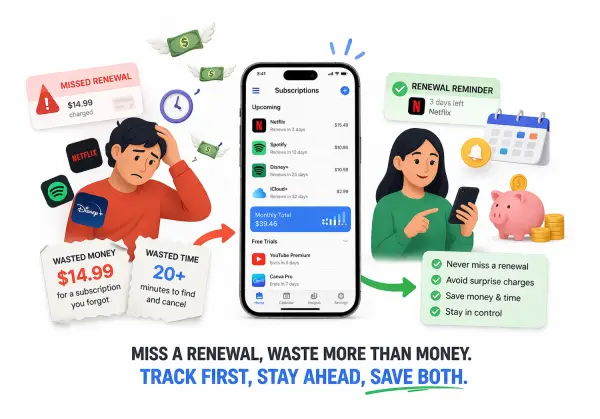
Track subscriptions, free trials, and renewal dates in one clean place without linking your bank account.
Stop surprise charges, stay on top of monthly app costs, and keep better control of what renews next.
The Real Problem Is Not Just Forgetting One Renewal
Subscription problems rarely start with one big mistake. They usually build from small charges that feel harmless on their own, then turn into a monthly total that is bigger than expected.
» Small recurring charges become hard to see
A free trial turns into a paid plan. A streaming app renews quietly. A storage plan or AI tool keeps charging because you meant to review it later.
That is why many people search for the best subscription tracker for iPhone. The problem is not only forgetting one charge. It is losing visibility over time.
» Apple shows subscriptions, but it does not organize the whole problem
Apple already lets iPhone users view, change, and cancel subscriptions in Settings. That is useful, and for some people it is enough.
But Apple’s built-in subscription list does not solve everything. It does not act like a reminder system, a monthly total dashboard, or a cleaner place to track free trials, renewal timing, and cancel links in one view.
» The right tracker helps you stay ahead, not just look things up later
A good subscription tracker helps before the charge hits, not after. It keeps renewal timing visible, makes free trials easier to catch, and gives you more control without pushing you into a bank-linked finance setup.
What Makes a Subscription Tracker Actually Worth Using?
The best subscription tracker for iPhone should make your life simpler, not heavier. It should help you stay organized, protect your privacy, and keep the next step easy.
👉 Renewal reminders before charges hit
A tracker should remind you before the money leaves your account. That is one of the easiest ways to stop surprise renewals.
👉 Free-trial tracking
Free trials are where many small paid subscriptions begin. A good tracker helps you see those dates early enough to act.
👉 Monthly total visibility
It should be easy to see how much your recurring app costs are adding up to each month. That one number often changes how people think about what to keep.
👉 Saved cancel links
A good tracker should make cancellation easier later, not harder. Keeping cancel links visible saves time when you are ready to stop paying.
👉 Privacy without bank login
Not everyone wants to connect bank cards or bank accounts just to track subscriptions. For many users, reminder-first tracking is enough and feels safer.
👉 Simple daily usability on iPhone
The best tracker should feel quick and clear on a phone screen. You should be able to check what renews next in seconds, not fight with a cluttered system.
A Simple Way to Choose the Best Subscription Tracker for iPhone
If you are comparing options, use this framework first. It helps you choose the right kind of tracker before you choose a specific app.
1. Do you want reminders or full financial account linking?
Some people want a tracker that connects directly to their financial accounts. Others only want reminders, visibility, and control.
Why many users only need reminders and visibility
If your goal is to stop surprise renewals, track free trials, and keep monthly costs visible, you may not need bank linking at all. In many cases, that adds more access than the job really requires.
When no-bank-login tracking is better
A no-bank-login tracker makes more sense when you want:
- stronger privacy
- less setup
- manual control over what you track
- a cleaner reminder-based system
For a lot of iPhone users, that is the better fit.
2. Do you want to track free trials before they turn paid?
Free trials are one of the easiest places to lose money without noticing.
Why trial reminders matter
A trial can look harmless when you sign up. The problem starts when you forget the date and the plan renews quietly.
Why this is one of the easiest places to save money
A tracker that catches trial endings before they turn into paid renewals can save money with almost no effort. That is one of the strongest features to look for.
3. Do you want to see your monthly subscription total clearly?
Many people know what they are subscribed to, but still do not have a clean view of what those subscriptions cost together.
Why small recurring costs feel bigger over time
A few small charges may not feel serious on their own. Over time, they become a monthly total that affects your budget more than expected.
Why monthly total visibility changes decisions
Once you can see the full monthly number clearly, it becomes much easier to decide what is still worth keeping and what is not.
4. Do you want canceling to feel easier later?
A subscription tracker should not just show what you are paying for. It should also make the next step easier when you want out.
Saved cancel links
Saved cancel links can remove a lot of friction. Instead of digging through emails or account pages, you already know where to go when you are ready.
Keeping the next step simple
The best subscription tracker for iPhone should not only help you monitor subscriptions. It should also make it easier to act when you decide something is no longer worth the money.
When Apple’s Built-In Subscription List Is Enough
This is important because not everyone needs a separate tracker.
Apple already lets users check and manage subscriptions through Settings on iPhone. For some people, that is enough.
» You only need to check or cancel once in a while
If you rarely forget subscriptions and only want to check or cancel something occasionally, Apple’s built-in list may be all you need.
» You do not need reminder timing
If reminder timing is not important to you, a separate tracker may not add much value.
» You are managing a small number of subscriptions
If you only have a few subscriptions and already remember what renews, the built-in Apple view may feel simple enough.
That matters because the best tool is not the one with the longest feature list. It is the one that matches the actual job you need done.
When a Dedicated Subscription Tracker Makes More Sense
Apple’s built-in subscription list is useful, but it is not designed to solve the full reminder-and-visibility problem. A dedicated subscription tracker makes more sense when you need more control before charges happen, not just a place to look things up afterward. Apple’s own support page shows users how to manage subscriptions in Settings, which is helpful, but that still leaves gaps around reminders, tracking, and organization.
» You forget renewals before they hit
If charges keep surprising you, that is a strong sign the built-in view is not enough for how you manage subscriptions. The better solution is not more memory. It is better visibility before the renewal date arrives.
» You want free-trial reminders
Free trials are one of the easiest ways to lose money quietly. A dedicated tracker makes more sense when you want an earlier warning, not just a way to cancel after the paid charge has already started.
» You want one cleaner place for recurring costs
A good subscription tracker helps bring recurring app costs into one simple view. That matters when streaming, storage, AI tools, and productivity apps start piling up across the month.
» You do not want to link bank cards or bank accounts
This is one of the biggest reasons people choose a dedicated tracker instead of a finance-style app. For many users, the goal is not account syncing. It is staying organized without giving up financial privacy.
» You want saved cancel links and better organization
The best subscription tracker for iPhone should not only tell you what renews next. It should also make it easier to take action later, especially when you want to cancel a plan quickly without searching through emails or account menus.
Why Privacy Matters More Than Most Subscription Trackers
Privacy is not a small feature here. For many users, it is the difference between using a subscription tracker and avoiding one.
Several active subscription-tracker apps in the App Store now lead with privacy-first messaging such as “no bank connection,” “privacy first,” or offline/on-device control. That shows how important this concern already is in the market.
👉 Not everyone wants a finance app just to track subscriptions
A lot of people do not want subscription tracking to turn into a full financial-access product. They just want a clean way to remember renewals, track free trials, and stay aware of monthly costs.
That is a very different job from a budgeting or bank-linked money app.
👉 No bank login can be a real advantage
No bank login means:
- less setup
- less friction
- less worry about sensitive financial access
- more control over what you choose to track
For many iPhone users, that is not a limitation. It is a benefit.
👉 Why manual tracking is often enough for this job
For subscriptions, manual tracking often works well because the real need is simple:
- know what is active
- know what renews next
- know what is costing you money
- know how to cancel when you are ready
That does not always require bank syncing. It often just requires better organization.
👉 What privacy-first tracking still does very well
A privacy-first tracker can still do the most important parts of the job extremely well:
- renewal reminders
- free-trial tracking
- monthly total visibility
- saved cancel links
- cleaner subscription organization
That is why this type of tracker fits so many users better than a more invasive alternative.
The Best Fit for This Type of User: Substraky
If you want a subscription tracker for iPhone that is reminder-first, privacy-first, and easy to control, Substraky is a strong fit.
The goal here is not to recommend the loudest app or the most feature-heavy finance tool. It is to recommend the type of tracker that solves the actual problem well.
» Why Substraky fits this problem well
Substraky fits this job because it focuses on the things many iPhone users actually need:
- stop surprise renewals
- track free trials
- keep recurring costs visible
- avoid linking bank cards or bank accounts
- stay organized without turning subscription tracking into a finance project
It is built around visibility and control, not unnecessary complexity.
» What Substraky helps you track
👉 Renewal dates
Keep upcoming subscription charges visible before they hit.
👉 Free trials
Track trial end dates so you can decide before they quietly turn paid.
👉 Monthly totals
See your recurring subscription costs more clearly in one place.
👉 Saved cancel links
Keep cancellation paths easier to reach when you are ready to stop a plan.
👉 Apple Calendar export
Add another reminder layer through Apple Calendar when you want more visibility.
» Why Substraky is a strong choice for privacy-first iPhone users
Substraky is a strong choice when privacy matters because it is built around tracking and reminders, not financial account access. That makes it a cleaner fit for users who want subscription control without sharing bank-linked details.
When Substraky makes more sense than a bank-linked tracker
Substraky makes more sense when:
- you want reminders, not financial syncing
- you want to track subscriptions without linking your bank
- you want a simpler iPhone-first experience
- you care more about control and visibility than automatic account analysis
If that sounds like the type of tracker you actually want, Substraky fits the job well.
What a Good Subscription Tracker Should Help You See
A good subscription tracker should make the money side easier to understand before the next charge happens. It should not just store names in a list. It should help you see what matters most when you are deciding what to keep, what to review, and what to cancel. Apple already lets users manage subscriptions in Settings, so a dedicated tracker needs to add more practical visibility than that basic list alone.
👉 What renews next
You should be able to open the tracker and immediately see what is charging soon. That matters because renewal timing is often the difference between staying in control and getting surprised by another charge.
👉 What is costing you the most each month
A strong subscription tracker should make recurring costs easier to compare. When you can see which apps, services, or plans are taking the biggest share of your monthly spend, it becomes easier to decide what still earns its place.
👉 Which free trials need attention
Free trials are easy to ignore when sign-up takes only a minute. A good tracker should make those trial end dates visible enough that you can act before they quietly become paid subscriptions.
👉 What you may no longer be using
One of the most useful things a tracker can do is help you notice subscriptions that no longer fit your life. That is where better visibility turns into better decisions.
👉 Where to cancel when you are ready
A tracker should not only tell you what is active. It should also make the next step easier. Saved cancel links or clear cancellation paths can save time and reduce friction when you decide a subscription is no longer worth the money.
Examples That Make the Decision Easier
Sometimes the easiest way to choose the best subscription tracker for iPhone is to look at situations that feel familiar.
Example 1: You only forget one or two renewals a year
If this is your situation, you may not need a complex finance app. A simple reminder-first tracker can be enough because the real problem is timing, not account-level budgeting.
Example 2: Free trials keep turning into paid subscriptions
This is one of the clearest signs that a dedicated tracker makes sense. If free trials keep slipping past you, reminders and visibility matter more than a huge feature list.
Example 3: You want privacy and do not want to link your bank
Many active subscription-tracker apps now use privacy-first positioning, no-bank connection, or similar messaging because users care about this. If that is your concern, a manual, reminder-based tracker is often the better fit.
Example 4: You want monthly totals and easier cancellation
If you want to see what your subscriptions cost together and keep cancel links easier to reach later, a dedicated tracker usually gives more practical value than checking one subscription at a time in different places.
Why You Can Trust This Recommendation Process
This page is built around real subscription problems, not around chasing the longest app list or the biggest feature table. The goal is to help users choose the type of tracker that actually fits how they manage subscriptions on iPhone.
👉 Built around real subscription problems, not generic app lists
The recommendation process starts with the real friction people deal with: surprise renewals, free trials turning paid, recurring costs getting harder to see, and cancellation paths that are easy to lose. That makes this page more useful than a generic “top apps” roundup.
👉 Focused on reminders, visibility, privacy, and control
Those four things matter because they match the real reason many people search for the best subscription tracker for iPhone in the first place. They want to stay ahead of charges without giving up privacy or adding unnecessary complexity. Apple’s built-in tools help with management, but many users still need reminders, totals, and better organization.
👉 Not every user needs a bank-linked tracker
That is an important point. Some users do want deeper account-connected tracking, but many do not. If the main goal is renewal control, free-trial reminders, and monthly subscription awareness, a privacy-first tracker can be the smarter choice. App Store competitors clearly show that this privacy concern is already a major conversion angle in the market.
👉 The goal is the better fit, not the bigger feature list
The best subscription tracker for iPhone is not automatically the one with the most features. It is the one that solves your actual problem with the least friction. For many users, that means a cleaner, reminder-first, control-focused tracker rather than a heavier finance-style app.
Related Pages That Can Help Next
If you are looking for more than subscription tracking, these pages can help with other everyday iPhone decisions that affect spending, upgrades, and daily use.
Best iPhone Productivity Tools for Daily Decisions
If you want practical iPhone tools for tracking subscriptions, checking battery health, comparing iPhones, and deciding when to upgrade, this page brings the main options together in one cleaner place.
Should I Upgrade My iPhone or Wait?
If subscription costs are part of a bigger money decision and you are also thinking about replacing your phone, this guide helps you compare battery, value, cost, and timing before you move.
Battery Replacement or New iPhone?
If your budget is tight and you are deciding whether to repair your current phone or spend on a new one, this page helps you compare the value of battery replacement against the cost of upgrading.
These related pages are useful because they connect one decision to the next instead of forcing you into a rushed choice.
FAQ in 2026
1. What is the best subscription tracker for iPhone?
The best subscription tracker for iPhone is the one that helps you stay ahead of renewals, track free trials, see your monthly total clearly, and keep control without adding unnecessary friction. For many users, that means a reminder-first, privacy-first tracker instead of a bank-linked finance app.
2. Can I track subscriptions on iPhone without linking my bank account?
Yes. You do not need to connect your bank account just to track subscriptions. A privacy-first subscription tracker can help you manage renewal dates, recurring costs, and free trials without linking bank cards, bank accounts, or sensitive financial details.
3. Does iPhone already show my subscriptions?
Yes. iPhone already lets users view and manage subscriptions in Settings. That works well for basic checking and canceling, but many users still want reminders, monthly totals, free-trial visibility, and a cleaner way to stay organized before charges happen.
4. Why use a dedicated subscription tracker instead of Apple’s built-in subscription list?
Apple helps you see and manage subscriptions, but a dedicated subscription tracker can do more for day-to-day control. It can help you:
- catch renewals before they hit
- track free trials
- keep monthly costs visible
- save cancel links
- stay organized in one cleaner view
5. What should a good subscription tracker help me see?
A good subscription tracker should help you see:
- what renews next
- which subscriptions cost the most each month
- which free trials need attention
- what you may no longer be using
- where to cancel when you are ready
That is what makes the tool useful, not just the number of features.
6. What is the best subscription tracker for iPhone without bank login?
For users who care about privacy and simple control, the best subscription tracker for iPhone without bank login is usually one that focuses on reminders, visibility, and manual tracking. That kind of setup works well when your goal is to stop surprise renewals without sharing financial access.
7. How do I stop surprise subscription renewals on iPhone?
The best way is to keep renewal dates visible before charges happen. A subscription tracker with reminder timing and free-trial tracking can help you act early instead of noticing the charge after it is already paid.
8. Can I track free trials on iPhone before they turn into paid plans?
Yes. A strong subscription tracker should help you track free trials before they renew. This is one of the easiest ways to avoid wasted money because many paid subscriptions start as trials people meant to review later.
9. How do I know if I need a subscription tracker at all?
You probably need one if:
- you forget renewals
- free trials keep turning into paid plans
- you do not know your monthly subscription total
- you want a cleaner way to organize recurring costs
- you do not want to dig through apps, emails, and account pages every time
If none of those sound familiar, Apple’s built-in subscription list may already be enough.
10. Is a manual subscription tracker still worth it?
Yes, for many users it is. Manual tracking is often enough because the main job is simple: reminders, visibility, and control. If you do not want bank linking, a manual reminder-first tracker can be a better fit than a heavier finance app.
11. What makes Substraky a strong choice for iPhone users?
Substraky is a strong fit for users who want:
- renewal reminders
- free-trial tracking
- monthly total visibility
- saved cancel links
- Apple Calendar export
- no bank login or financial account linking
It is built for users who want control without extra complexity.
12. Is Substraky safe to use?
Yes. Substraky is designed to be safe, simple, and privacy-focused. It helps you track subscriptions, renewal dates, and recurring costs without linking bank accounts or sharing sensitive financial details.
13. Does Substraky work on iPhone and iPad?
Yes. Substraky is built for both iPhone and iPad users who want a cleaner way to manage subscriptions and reminders.
14. What should I do next if I want a simpler way to track subscriptions?
Start with a tracker that matches the real problem you want to solve. If you want reminders, monthly totals, free-trial tracking, and more privacy without bank linking, start tracking with Substraky.