
BattScope — Battery Health Analyzer
(Get a Clear Battery Health Report PDF)
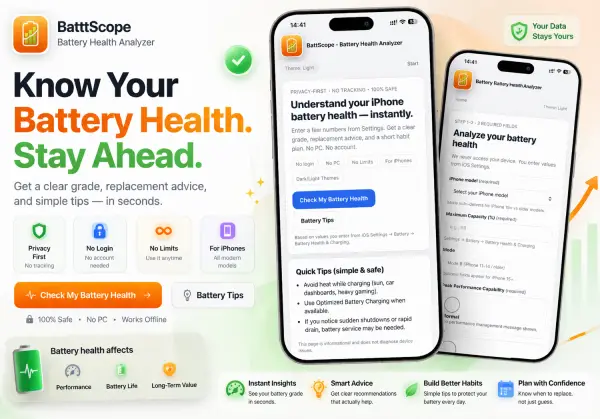
BattScope helps you understand whether your current iPhone battery is still worth keeping, whether battery replacement makes sense, or whether it may be time to start planning your next move. Instead of guessing from one percentage, you get a cleaner battery summary built around real decisions.
What BattScope Does (Quick Summary)
BattScope is an iPhone battery health analyzer app that converts your iOS Settings numbers into a readable, decision-friendly report.
- Battery health analysis from iOS Settings values you enter (no device access)
- A simple result with a battery health confidence level report
- A short “what this means” explanation (no confusing battery jargon)
- Main wear drivers based on your inputs (when available)
- A clean battery report PDF download option to save or share
If you want a quick answer without digging through forums or guessing, BattScope is built for that moment.
Know Whether Your Battery Is Still Worth Keeping
A battery percentage alone does not always tell the full story.
Your iPhone can still show an acceptable number on paper while feeling weaker in daily use. Battery life may drop faster, charging may feel more frequent, and the phone may no longer feel as dependable as it used to.
BattScope is built for that moment.
It helps turn your battery details into a more useful next step, so you can decide whether to keep using your current iPhone, think about battery replacement, or start planning ahead.
What BattScope Does
BattScope turns your battery details into a clear, decision-focused report.
What you get
- Battery condition summary
- Confidence level
- Likely wear drivers
- Practical next-step guidance
- Optional PDF report
Best for
- Checking whether your iPhone is still worth keeping
- Thinking through battery replacement timing
- Understanding fast drain or weaker reliability
- Saving a report before repair, resale, or upgrade planning
BattScope Features
- Clear battery health analysis
Turn basic iPhone battery details into a more useful battery condition summary. - Battery decision support
Helps you understand whether your current iPhone battery is still worth keeping or if replacement planning makes more sense. - Confidence-based results
Adds a confidence level to make the report easier to understand and more practical to use. - Battery wear insights
Highlights likely wear drivers such as charging habits, heat exposure, and long-term battery use patterns. - Keep, monitor, or replace guidance
Gives a clearer next-step direction instead of leaving you with one battery percentage and no context. - Simple iPhone input flow
Uses battery details you already see in iPhone Settings, so the process stays familiar and easy. - Optional deeper battery context
Lets users add extra battery-use details for a more helpful report. - PDF battery report download
Save your result as a clean report for personal reference, repair planning, resale, or upgrade decisions. - Privacy-first use
No bank details, payment details, or unrelated personal information are needed. - No hidden device access
Built around user-entered battery values for a simpler and more controlled experience. - Clean and easy-to-read results
Focuses on practical battery clarity instead of technical overload. - Works as part of iPrimer
BattScope is included inside iPrimer, alongside tools for subscription tracking, iPhone comparison, and upgrade planning.
How BattScope Works
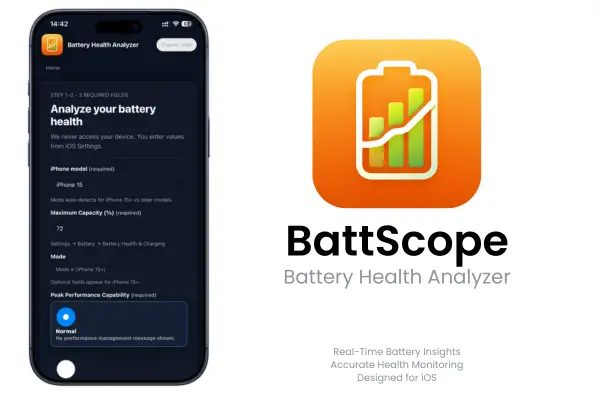
Step 1 — Enter the battery details your iPhone already shows you
Start with the key battery information visible in Settings, such as:
- iPhone model
- Maximum Capacity
- Peak Performance Capability
Step 2 — Add optional battery-use details
For a more useful report, BattScope can also consider:
- Charging habits
- Heat exposure
- Fast charging frequency
- Battery age or cycle count if known
Step 3 — Get a clearer result
Your report can include:
- Battery condition summary
- Confidence level
- Likely wear drivers
- Keep, monitor, or replacement planning guidance
- PDF download option
What the Results Mean
A battery report should help you decide what to do next.
Battery condition summary
Get a simpler view of where your battery stands right now.
Confidence level
See how strong the result is based on the details you entered.
Likely wear drivers
Understand what may be contributing to faster battery wear.
Next-step guidance
BattScope helps you decide whether:
- your iPhone is still fine for now
- you should monitor battery health more closely
- battery replacement may be worth planning
- repair vs upgrade is the better next step
When BattScope Is Most Useful
👉 Your battery feels worse than the percentage suggests
The number may look acceptable, but real daily use tells a different story.
👉 You are not sure if battery replacement is worth it
BattScope helps frame that decision more clearly before you spend money.
👉 You are deciding between repair and upgrade
Sometimes the real question is not just battery health. It is whether this phone still makes sense for your daily use.
👉 You want a report you can save
Keep a cleaner battery summary for personal reference, repair planning, resale, or upgrade decisions.
Battery Replacement or New iPhone?
This is one of the most common iPhone decisions.
When battery replacement usually makes sense
Battery replacement may be the better move when:
- your phone still does what you need
- battery life is the main issue
- the rest of the device still feels worth keeping
When upgrading may be the smarter move
Upgrading may make more sense when:
- your battery is worn out and other limits are piling up
- the phone no longer fits your daily needs
- repair cost no longer feels worthwhile
How BattScope helps
BattScope helps you think through what your battery status means in practical terms, so you can choose your next step with more confidence.
Download BattScope Free
Get BattScope through the iPrimer Productivity Appstore in a few taps. Download iPrimer and install BattScope directly (no sideloading methods), and run your battery health report, no PC, no jailbreak, remove anytime.
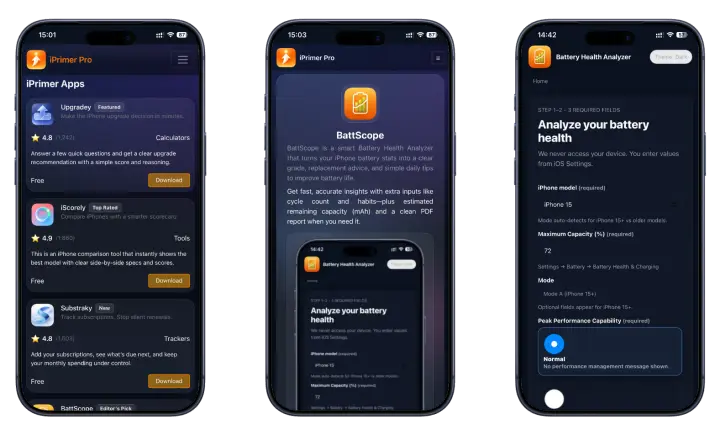
• No subscriptions • No jailbreak • No PC • Fast & easy installation
BattScope Compatibility
Versions: It is compatible for running iOS 17 – 26.0 on all devices (including iOS 26 – 26.4).
Models: BattScope works on all iPhone models, with a clean layout for any screen size.
Install BattScope Through iPrimer (Install Path)
BattScope is available inside iPrimer Productivity Appstore, so you can install fast with no extra setup.
- Download iPrimer (read more about iPrimer) app
- Open iPrimer and install BattScope – Battery Health Analyzer
- Tap Check My Battery Health and enter your iOS Settings values
- Generate your report (and Open Report (PDF) if you want to save it)
- Remove anytime, no PC install, no jailbreak, no system changes (uninstall guide)
Get BattScope Through iPrimer
BattScope is included inside iPrimer, so you get more than battery decision support.
What else you get inside iPrimer
👉 Substraky — Subscription Tracker
Track subscriptions and avoid surprise renewals without linking sensitive financial details.
👉 Upgradey — iPhone Upgrade Decision Calculator
Decide whether upgrading now makes sense or whether waiting is the smarter move.
👉 iScorely — iPhone Comparison Tool
Compare iPhones by value, battery, and camera without getting lost in spec overload.
How BattScope Works
Step 1 — Enter the 3 required values
This is the fastest way to check iPhone battery health accurately using what iOS already shows you.
You’ll enter:
- iPhone model
- Maximum Capacity (%)
- Peak Performance Capability (what your iPhone currently reports)
What does “Maximum Capacity” mean on iPhone?
It’s iOS’s estimate of how much charge your battery can hold compared to when it was new. BattScope uses it as a core signal—then combines it with your other inputs to generate a clearer result.
How to find Maximum Capacity (%) on your iPhone
Go to Settings → Battery → Battery Health & Charging.
There, you can view your iPhone’s Maximum Capacity (%).
Step 2 — Optional inputs (improves accuracy)
If you want a smarter, more precise report, add optional details. This is where BattScope becomes a battery health analyzer with optional inputs that can reflect real life better.
Optional inputs can include:
- Daily charging pattern (light vs heavy use habits)
- Heat exposure (hot car, sun, heavy gaming while charging)
- Fast charging frequency (helps explain wear patterns)
- Overnight charging habits
- Battery age estimate
- Cycle count (if you know it)
- Charging limit / optimized charging usage
These don’t “unlock” anything these simply help BattScope explain why your battery looks the way it does. Better inputs = better accuracy.
Step 3 — Get your Battery Health Report
BattScope generates a clean result you can act on:
- A simple status (example: normal wear / high wear)
- A confidence level (so you know how solid the result is)
- Replacement tips (when it’s time, it’s clearly explained)
- Main wear drivers explained (based on your inputs)
- A short action plan (simple steps you can actually follow)
- Optional battery report PDF so you can save the summary
Important: the report is based on the values you enter. If you want the most accurate result, enter what iOS shows you exactly.
Your Results Explained
BattScope is built to be clear about why it shows a result—not just what the result is. Your report is a mix of your battery health confidence level plus what your inputs suggest about wear, performance, and reliability.
Mini block: Confidence level (why it’s Medium / High)
- High confidence usually means your required inputs line up cleanly (Maximum Capacity + Peak Performance status + model), with no conflicting signs.
- Medium confidence usually means one of these is true: optional details were skipped, your usage pattern is unclear, or your inputs suggest mixed signals (for example, capacity is low but performance messages don’t match).
Mini block: Replacement recommendation (how to read it)
BattScope is a replacement tips tool, not a diagnostic service. If your report says “replace now tips,” it’s because your inputs point to higher wear and reduced reliability not because BattScope accessed your device.
Mini block: Main wear drivers (what we detected from inputs)
In the “Main wear drivers” area, BattScope highlights likely causes based on what you entered, such as:
- heat exposure patterns
- frequent fast charging
- heavy daily charging routine
- older battery age estimate / high wear indicators
This is the “battery wear drivers explained” part—so you can change habits or plan a replacement without guessing.
Battery Replacement or New iPhone?
This is one of the most common iPhone decisions.
When battery replacement usually makes sense
Battery replacement may be the better move when:
- your phone still does what you need
- battery life is the main issue
- the rest of the device still feels worth keeping
When upgrading may be the smarter move
Upgrading may make more sense when:
- your battery is worn out and other limits are piling up
- the phone no longer fits your daily needs
- repair cost no longer feels worthwhile
How BattScope helps
BattScope helps you think through what your battery status means in practical terms, so you can choose your next step with more confidence.
Battery Health Benchmarks (Quick guide by %)
These ranges help you interpret the number fast. What you “feel” can vary by model and usage, but this is a useful baseline.
90–100% (Strong)
- What you usually feel: normal battery life, steady performance
- What to do next: keep good habits (avoid heat while charging)
80–89% (Noticeable wear)
- Is 80% battery health good? It’s still usable for many people, but wear is real.
- What you usually feel: faster drain, more top-ups during the day
- What to do next: monitor for shutdowns; tighten charging habits
75–79% (High wear for daily use)
- Should I replace at 75%? If you’re seeing drain, lag, or shutdowns, replacement often makes sense.
- What you usually feel: battery anxiety, performance dips under load
- What to do next: plan a battery replacement window, especially if reliability matters
70–74% (Severe wear / reliability risk)
- Is 70% battery health bad? For most users, yes—expect big impact.
- What you usually feel: heavy drain, sudden drops, possible shutdowns
- What to do next: replacement is usually the best move for stability
Below 70% (Critical wear)
- What you usually feel: unpredictable battery, frequent charging, poor reliability
- What to do next: replace soon, or consider upgrading if other issues exist
PDF Report (Share / Save)
BattScope can generate a clean summary you can keep, so you don’t have to re-check everything later.
- Battery health report PDF download in one tap
- Includes your result, confidence level, key drivers (when available), and a short action plan
- Easy to save, share, or keep for upgrade planning
Why You Can Trust BattScope
👉 Uses battery details you already see in Settings
BattScope is built around battery information users can already access themselves.
👉 No hidden device access
The tool works from the battery details you provide.
👉 Privacy-first battery checking
You do not need bank details, payment details, or unrelated personal data.
👉 Built to explain the result, not just show a number
BattScope focuses on helping users understand what their battery status means for the next decision
BattScope Safety, Privacy & Control
BattScope is designed for a safe, privacy-first battery check.
- Battery health check without login
- You enter values from iOS Settings.
- We don’t access device sensors or battery telemetry.
- No tracking. No background collection.
- Your data stays with you (you can use it, delete it, or change it anytime)
- Safe to install and uninstall—no system file changes on iPhone or iPad
Why You Can Trust BattScope
Uses battery details you already see in Settings
BattScope is built around battery information users can already access themselves.
No hidden device access
The tool works from the battery details you provide.
Privacy-first battery checking
You do not need bank details, payment details, or unrelated personal data.
Built to explain the result, not just show a number
BattScope focuses on helping users understand what their battery status means for the next decision
Report-Based Guidance (Not Personal Advice)
BattScope isn’t personal advice or a repair recommendation.
It uses the values you enter to analyze your battery condition and generate a clear report—so you can understand your battery level, what it may mean for daily use, and what to consider doing next. The final decision is always yours.
BattScope FAQ 2026
1. How do I check iPhone battery health accurately?
Open Settings → Battery → Battery Health & Charging, then use the values shown there. Enter them into BattScope to get a clear report based on what your iPhone already displays.
2. What does “Maximum Capacity” mean on iPhone?
Maximum Capacity is the battery’s health percentage compared to when it was new. A lower number means the battery holds less charge than it used to.
3. What is a normal iPhone battery health percentage?
There isn’t one perfect number, but most phones feel “normal” when battery health is high. As it drops, you’ll usually notice faster drain and more frequent charging.
4. Is 80% battery health good on iPhone?
It can still be usable, but you’ll often feel shorter battery life. If you rely on all-day battery, this is where planning a replacement starts to make sense.
5. Should I replace my iPhone battery at 75%?
If you’re seeing heavy drain, lag under load, or shutdowns, replacement is usually worth it. If your usage is light, you may be fine for a while—BattScope helps you judge with a report.
6. Is 70% battery health bad on iPhone?
For most users, yes. Battery life and reliability usually drop sharply, and replacement becomes the most practical fix.
7. When should I replace my iPhone battery?
Replace when battery health is low and it’s affecting your day fast drain, sudden drops, shutdowns, or performance issues. BattScope helps you decide using your inputs and an action plan.
8. Does fast charging damage iPhone battery health?
Fast charging can increase heat, and heat is one of the biggest drivers of battery wear. If you fast charge often, keeping the phone cool matters more than the charger type.
9. Does overnight charging hurt battery health?
Overnight charging isn’t automatically harmful, but long periods at 100% plus heat can speed up wear. Using Optimized Battery Charging (when available) helps.
10. What causes battery health to drop quickly on iPhone?
The most common causes are heat while charging, heavy daily use, frequent fast charging, long time at 100%, and older battery age.
11. How do I reduce battery wear on iPhone?
Avoid heat while charging, use Optimized Battery Charging, and don’t leave the phone at 100% for long periods when you can avoid it.
12. Does a battery health analyzer app access my device?
BattScope does not access your device sensors or battery telemetry. You enter values from iOS Settings, and the report is based on those inputs.
13. Is BattScope safe to install and uninstall?
Yes. It doesn’t change system files and can be removed anytime. It’s designed to be safe and lightweight.
14. Can I get a battery health report without login?
Yes. BattScope can be used without login, so you can generate a report without creating an account.
15. Can I download my battery report as PDF?
Yes. BattScope can generate a battery health report PDF, so you can save it, share it, or keep it for future planning.