
iPrimer Productivity Appstore for iPhone & iPad
One clean install for subscription tracking, battery decisions, iPhone comparisons, and upgrade planning.
iPrimer is built for people who use their iPhone or iPad every day and want faster answers to common decisions. Instead of juggling random apps, notes, and comparison tabs, you get four focused tools in one place to help you spend smarter, track better, and choose with more confidence.
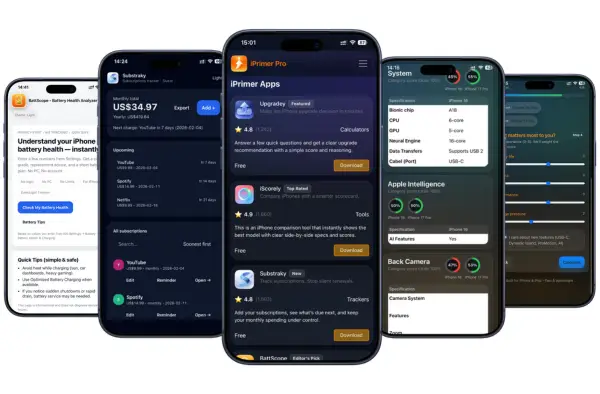
• No subscriptions • No jailbreak • No PC • Fast & easy installation
Why iPrimer Exists
Everyday iPhone decisions should not feel harder than they need to.
Many people lose money to forgotten renewals, hold onto a phone too long without knowing whether the battery is still worth keeping, or waste time comparing iPhones across messy spec charts that do not clearly answer the real question.
iPrimer was built to make those decisions easier.
Instead of pushing more clutter onto your device, iPrimer gives you four practical tools designed around real situations people deal with every month:
- surprise subscription renewals
- battery keep-or-replace decisions
- upgrade now or wait decisions
- choosing the best iPhone for value, battery, camera and more
This is not a generic app collection. It is a focused productivity toolkit for real iPhone and iPad decisions.
What You Get Inside iPrimer Appstore
iPrimer includes four purpose-built tools. Each one solves a different problem, but together they create a cleaner system for everyday iPhone planning.
BattScope — Battery Health Analyzer
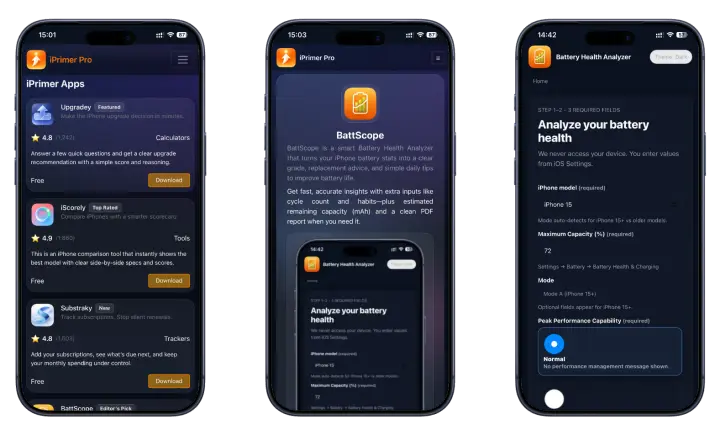
BattScope helps you make better battery-related decisions without relying on battery percentage alone.
Use BattScope when you want to understand whether your current iPhone is still worth keeping, whether the battery condition is becoming a real usability problem, or whether it is time to think about replacement instead of guessing.
Best for:
- battery condition checks
- keep-or-replace planning
- making smarter phone lifespan decisions
Substraky — Subscription Tracker
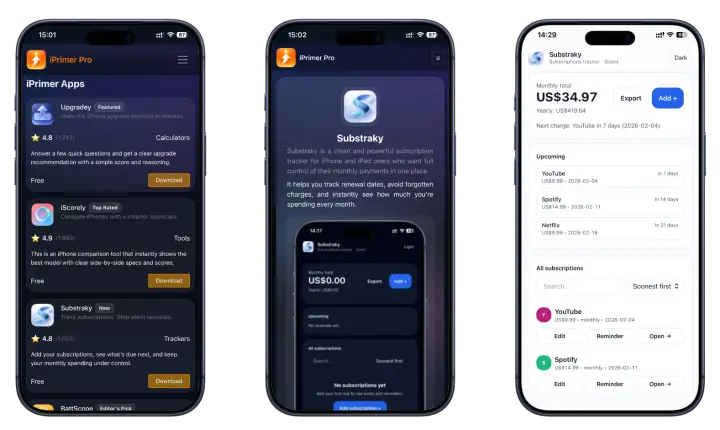
Substraky helps you keep recurring payments organized before they become wasted money.
If you are juggling multiple app subscriptions, trials, or monthly renewals, Substraky helps you track them in a cleaner way so you can see what is active, what is coming up, and what may no longer be worth paying for.
👉 No bank linking needed
Substraky does not require you to connect bank cards, bank accounts, or sensitive payment details. It is built to help you track subscriptions, remember renewal dates, and stay aware of what you are paying for without giving up your financial information.
Best for:
- tracking recurring app payments
- avoiding surprise renewals
- staying aware of monthly subscription costs
Upgradey — iPhone Upgrade Decision Tool
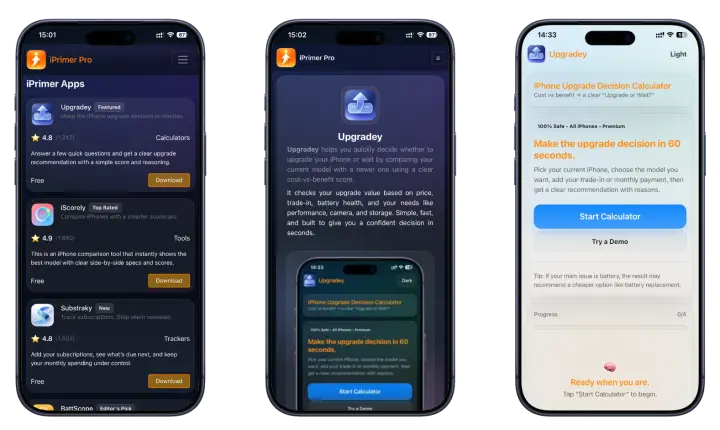
Upgradey helps you decide whether upgrading your iPhone now is actually worth it.
Instead of upgrading based on hype, pressure, or scattered browsing, Upgradey is built to help you think through timing, value, comfort, and practical benefit so you can make a smarter next-step decision.
Best for:
- deciding whether to upgrade now or wait
- checking if your current phone still makes sense
- thinking through upgrade value more clearly
iScorely — Smart iPhone Comparison Tool
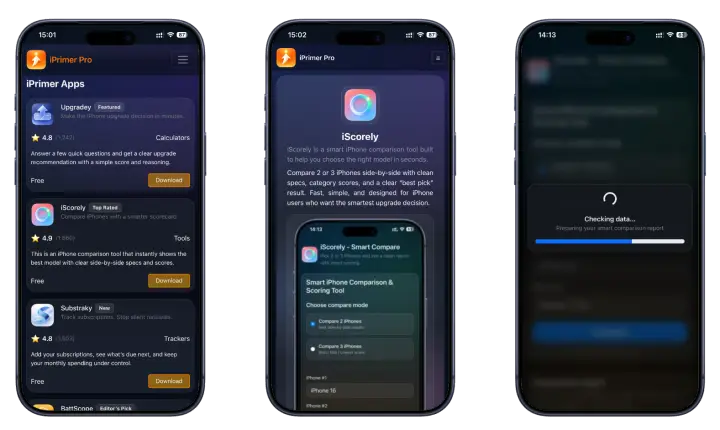
iScorely helps you compare iPhones without getting buried in endless specs.
When you are choosing between two or three models, iScorely keeps the comparison focused on the things people usually care about most in real life, like battery, camera, value, and overall fit.
Best for:
- comparing iPhones side by side
- narrowing down the best model for your needs
- avoiding spec overload while shopping
Choose the Problem You Want to Solve
Choose the decision you want help with, then open the tool built for it.
👉 I want to stop surprise renewals
Use Substraky to track recurring subscriptions and see what is really costing you every month.
👉 I want to know if my battery is still worth keeping
Use BattScope to get a clearer view before spending money too early.
👉 I want to know if I should upgrade now or wait
Use Upgradey to think through the timing and value of your next iPhone move.
👉 I want to compare two or three iPhones clearly
Use iScorely to keep the decision focused on what matters most.
Quick Comparison of the Four Tools
| Tool | Main problem it solves | Best use case |
| BattScope | Battery uncertainty | Decide whether your phone is still worth keeping |
| Substraky | Surprise renewals | Track recurring subscriptions and monthly totals |
| Upgradey | Upgrade confusion | Decide whether upgrading now makes sense |
| iScorely | Comparison overload | Compare iPhones by value, battery, and camera |
If you want all four in one place, iPrimer gives you the full toolkit in one cleaner setup.
iPrimer Features — Built for Real iPhone and iPad Decisions
iPrimer isn’t packed with unnecessary extras. Every feature exists for one reason: to help you make faster, smarter decisions on your iPhone or iPad.
1. Four Essential Tools in One Install
Instead of downloading multiple iPhone productivity apps, you get a focused productivity app bundle for iOS in one place.
Open iPrimer, choose your tool, and get straight to the result.
2. Clean, Decision-First Interface
No clutter. No endless menus.
Each tool inside iPrimer is built around one clear outcome—battery clarity, subscription visibility, upgrade confidence, or model comparison.
You won’t waste time figuring out what to tap next.
3. No PC. No Jailbreak. No Complexity.
You can install iPrimer on iPhone or iPad directly.
No cables, no desktop tools, and no risky system modifications.
4. Focused Results, Not Overloaded Data
Most iOS productivity tools overwhelm users with too much information.
iPrimer simplifies:
- BattScope highlights battery health insights you can act on
- Substraky keeps renewals and costs visible
- Upgradey simplifies upgrade timing decisions
- iScorely compares what actually affects daily use
Less noise. More clarity.
5. Easy Remove Anytime
Control matters. If you ever decide you don’t need iPrimer, you can uninstall it using standard device steps.
Install when you need it. Remove when you don’t.
6. Access to Upcoming Productivity Apps
iPrimer is not limited to just the current tools.
New productivity apps like Substraky, iScorely, and future releases are listed directly inside the iPrimer appstore.
As an iPrimer user, you can:
- Discover newly added productivity apps in one place
- Download and install updates easily
- Access upcoming tools without searching multiple sources
7. Regular Updates for iOS Compatibility
iPrimer stays aligned with modern iOS versions.
Updates focus on clarity improvements, compatibility adjustments, and smoother user flow—not unnecessary feature bloat.
8. Built for iOS 26 and Fully Compatible with iOS 17–18
Whether you’re using the latest iPhone or an earlier supported version, iPrimer runs cleanly across supported devices.
Download iPrimer Productivity Appstore 2026
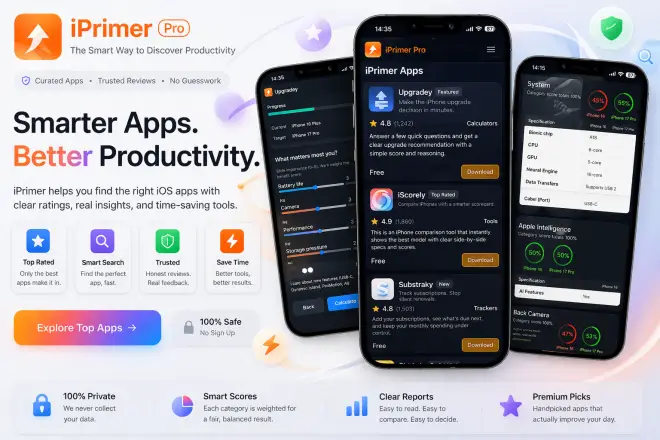
Get all essential iPhone and iPad productivity tools in one clean install. Manage subscriptions, check battery health, compare iPhones, and decide upgrades, without a PC or jailbreak.
Download iPrimer today and enjoy lifetime access with ongoing updates, simple install, and full control anytime.
How to Install iPrimer (No PC)
Installing iPrimer on iPhone or iPad is straightforward. No computer. No jailbreak. No complicated setup.
- Tap Download iPrimer
- Follow the on-screen install method shown on your device
- Open iPrimer and choose the tool you need
- Use it anytime, remove anytime
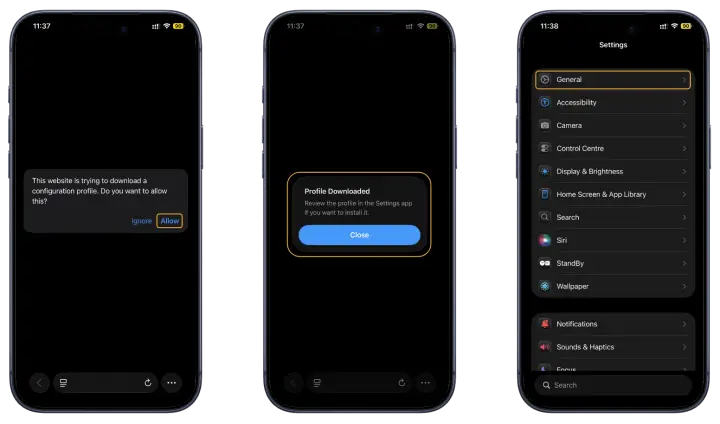
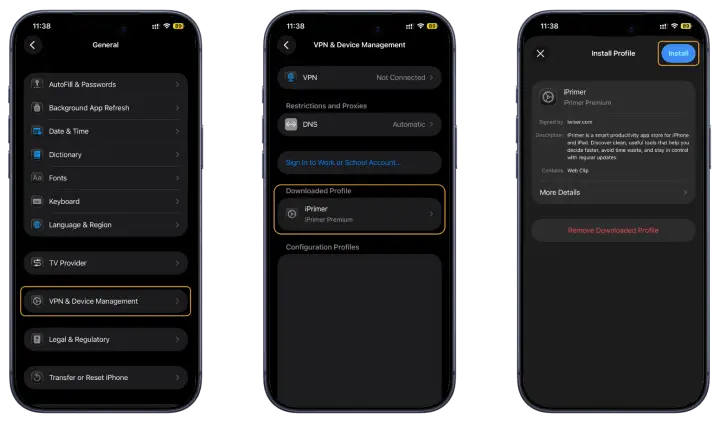
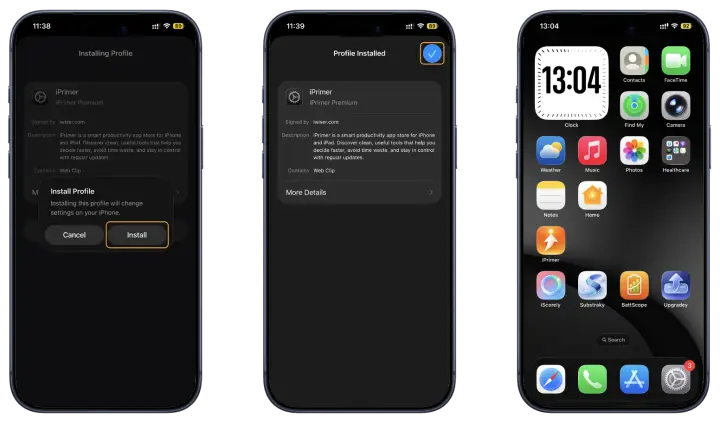
The process is guided step-by-step so you always know what’s happening. There are no hidden background installs or forced permissions.
Install Requirements
- Fully compatible with iOS 26 and later (iOS 17–18 supported)
- Works for iPhone and iPad
- No jailbreak required
- No Windows or Mac computer needed
If your device runs a supported iOS version, you’re ready.
How to Uninstall iPrimer or iPrimer Inside Apps
You stay in control from start to finish.
To remove iPrimer:
- Open Settings on your device
- Go to the General > Device Management > select “iPrimer”
- Select Remove
- Confirm removal
Once removed, iPrimer and its tools are no longer active on your device.
No complicated cleanup. No leftover steps. Just install when you need it, remove when you don’t.
Why Use iPrimer Instead of Separate Apps or Random Comparison Pages
👉 One product, four focused tools
You do not need a different app, note, or comparison tab for every small decision.
👉 Built for action, not just browsing
Each tool is designed to help you move toward a next step, not just dump information in front of you.
👉 Less switching, less clutter
Instead of collecting random utilities, you keep your decision tools in one product.
👉 Better long-term value
iPrimer is not just about one-time use. It is designed to help with recurring decisions you face over time as your device, subscriptions, and upgrade plans change.
How iPrimer Works
iPrimer keeps the process simple.
👉 Step 1 — Start with the question you need answered
Open the tool that matches the decision in front of you.
👉 Step 2 — Enter the details that matter
Each tool is designed around a specific use case, so the inputs stay focused and relevant.
👉 Step 3 — Get a clearer result
The goal is not just to show information. The goal is to help you understand what the information means for your next move.
👉 Step 4 — Decide with more confidence
Whether you are cutting waste, comparing models, or deciding on an upgrade, iPrimer is built to help you move from uncertainty to action faster.
How the Results Are Built
iPrimer is designed around practical decision support, not bloated dashboards or vague summaries.
Each tool uses a simpler input-to-result flow built around the type of question the user is actually trying to answer.
👉 BattScope
BattScope focuses on battery-related signals and condition context to help make battery status easier to understand in real use terms.
👉 Substraky
Substraky helps organize subscription details, renewal timing, and recurring cost visibility so users can see their subscription picture more clearly.
👉 Upgradey
Upgradey is built around upgrade timing, value, and user comfort factors so the decision is not driven by noise alone.
👉 iScorely
iScorely simplifies iPhone comparison into a more decision-ready format with practical focus areas like battery, camera, and value.
Why this matters
A lot of tools show data. Fewer tools help users make a clear next decision. iPrimer is built around that difference.
Why You Can Trust iPrimer
Useful tools need more than strong names. They need structure, clarity, and honest product design.
👉 Built around real iPhone user problems
The four tools inside iPrimer were not chosen randomly. They are built around practical situations iPhone users deal with often: subscriptions, battery uncertainty, upgrade timing, and model comparison.
👉 Product-first, not content-first
iPrimer is designed as a working product page first. It is not just an informational article wrapped around a sales pitch.
👉 Clear methodology direction
Each tool is structured around a defined decision use case, with outputs aimed at helping users understand what to do next.
👉 Transparent product growth
iPrimer is built to improve over time with refinements, new features, and clearer user flows.
👉 Focus on usefulness
The goal is not to overwhelm users with complexity. It is to make iPhone decisions easier, faster, and more practical.
Why is iPrimer important?
👉 Should I keep my current iPhone for another year?
If your phone still fits your needs, replacing it too soon can waste money. BattScope and Upgradey help make that decision feel less random.
👉 Am I paying for subscriptions I barely use?
Substraky helps you see recurring app payments in a cleaner view so it is easier to spot what is still useful and what is just draining your budget.
👉 Is this the right time to upgrade?
Upgradey helps frame the decision around value and timing instead of launch hype alone.
👉 Which iPhone gives me the best value for daily use?
iScorely helps keep comparisons focused on real-world priorities instead of long spec lists that slow down the decision.
Privacy, Control, and Product
iPrimer is built to stay simple and user-controlled.
👉 Clear purpose
The product is designed to help users think through common iPhone decisions more clearly.
👉 User control matters
You choose which tool to use, when to use it, and whether to keep or remove the product later.
👉 A cleaner experience
The goal is not to overload users with unnecessary complexity. It is to give them a more useful path through common mobile decisions.
👉 Support basics
If users need help, the product should make access, understanding, and next steps feel straightforward.
👉 Easy removal
If you ever want to remove iPrimer, the process should stay simple and manageable.
What You Get Over Time
👉 Ongoing product improvements
The product can continue improving as the tools become more refined, easier to use, and more helpful in real situations.
👉 New features and refinements
iPrimer is designed to grow with better decision support, stronger usability, and future expansion across the same productivity-first direction.
👉 Long-term value
Instead of depending on separate apps for every small task, users get one product built to support recurring device and cost-related decisions over time.
Is iPrimer Safe?
Yes. iPrimer is designed to be safe, simple, and user-focused. It brings together practical tools for subscriptions, battery checks, iPhone comparisons, and upgrade decisions without needing sensitive financial details or unnecessary complexity. The goal is to give users a cleaner, more controlled, and more useful experience on iPhone and iPad.
iPrimer Changelog
iPrimer v1.1 (Current)
The latest iPrimer update improves the overall product experience and makes the toolkit clearer, more useful, and more practical for everyday iPhone and iPad decisions.
What’s improved
- Improved the overall iPrimer experience for a cleaner productivity-focused workflow
- Refined tool access and usability across BattScope, Substraky, Upgradey, and iScorely
- Improved clarity across subscription tracking, battery decisions, upgrade planning, and iPhone comparisons
- Strengthened the product-first direction of iPrimer for real everyday decision support
- Improved overall consistency across the iPrimer toolkit
BattScope updates
- Improved battery result clarity for easier keep-or-replace decisions
- Refined the battery analysis flow for a more practical user experience
- Improved guidance for users checking whether their current iPhone is still worth keeping
Substraky updates
- Improved subscription tracking flow for a cleaner reminder-focused experience
- Refined renewal reminder support to help users avoid surprise charges
- Improved monthly subscription visibility for better recurring payment awareness
- Improved privacy-focused use without requiring bank card linking, bank account access, or sensitive financial details
Upgradey updates
- Improved upgrade decision flow for users deciding whether to upgrade now or wait
- Refined value-focused guidance for everyday iPhone upgrade scenarios
- Improved result clarity for users comparing upgrade timing and practical benefit
iScorely updates
- Improved comparison flow for users comparing two or three iPhones more clearly
- Refined score-based comparisons around battery, camera, and value priorities
- Improved result readability so iPhone comparisons feel easier to review and use
iPrimer v1.0.3
This update focused on improving usability, decision clarity, and overall consistency across the iPrimer toolkit.
What improved
- Improved the overall structure of the iPrimer toolkit for a smoother user experience
- Refined how each tool supports its main decision use case
- Improved clarity across battery, subscription, upgrade, and comparison workflows
BattScope updates
- Improved battery-focused usability and simpler result interpretation
- Refined the core battery-check flow for clearer everyday use
- Improved support for battery planning and device-life decisions
Substraky updates
- Improved recurring payment tracking for easier subscription organization
- Refined reminder clarity for better renewal awareness
- Improved visibility of active subscriptions and expected payment timing
Upgradey updates
- Improved upgrade calculator usability for smoother decision-making
- Refined upgrade logic around timing, comfort, and value
- Improved the experience for users planning their next iPhone move
iScorely updates
- Improved comparison usability for clearer model-to-model decisions
- Refined scoring presentation for easier review of practical differences
- Improved the experience for users narrowing down the best iPhone fit
iPrimer v1.0.2
This update focused on strengthening the core product flow and improving the practical usefulness of each included tool.
What improved
- Improved the base iPrimer experience for a more focused productivity workflow
- Refined the tool structure for better usability and cleaner navigation
- Improved the overall direction of iPrimer as a practical decision-support toolkit
BattScope updates
- Refined the early battery analysis experience
- Improved battery condition guidance for clearer next-step thinking
- Improved the overall battery-check flow
Substraky updates
- Improved the base subscription reminder experience
- Refined recurring payment tracking visibility
- Improved simple subscription organization for everyday use
Upgradey updates
- Improved the early upgrade decision experience
- Refined practical support for upgrade-or-wait use cases
- Improved clarity around everyday iPhone upgrade planning
iScorely updates
- Improved the early comparison flow for easier side-by-side review
- Refined score-focused comparison structure
- Improved readability for value, battery, and camera comparisons
iPrimer v1.0.1
This was the foundational iPrimer release, introducing the core toolkit experience for iPhone and iPad users.
Initial release highlights
- Introduced iPrimer as a productivity toolkit for iPhone and iPad
- Added BattScope, Substraky, Upgradey, and iScorely inside the iPrimer experience
- Built the initial product around four everyday iPhone decision areas:
- battery health and keep-or-replace decisions
- subscription tracking and renewal awareness
- upgrade-now-or-wait planning
- iPhone comparison by practical priorities
- Established the base product direction around clearer, simpler, and more useful decision support
iPrimer FAQ 2026
1. What is iPrimer Productivity Appstore iOS?
iPrimer is a focused productivity appstore for iPhone and iPad that includes four tools in one install: BattScope (battery health), Substraky (subscription tracker), Upgradey (upgrade decision tool), and iScorely (iPhone comparison tool). It helps you manage everyday device decisions without switching between multiple apps.
2. How do I download iPrimer on iPhone?
To download iPrimer, tap the official Download iPrimer button on this page and follow the on-screen install method. The process is completed directly on your device—no PC required.
3. How to install iPrimer without PC?
You can install iPrimer without a Windows or Mac computer.
Steps:
- Tap Download iPrimer
- Follow the guided on-screen instructions (guide)
- Complete the install process on your device
- Open iPrimer and choose your tool
No desktop software or cables are needed.
4. Does iPrimer require jailbreak?
No. iPrimer does not require jailbreak. It is designed for users who want productivity tools without modifying their device system.
5. Is iPrimer safe to install?
Yes. iPrimer is built for simple install and full removal control. It does not require jailbreak and can be uninstalled at any time using standard device steps. You always see what is being installed.
6. Does iPrimer work on iPhone and iPad?
Yes. iPrimer works on supported iPhone and iPad devices running iOS 26 and later (iOS 17–18 fully compatible). It is optimised for mobile-first use.
7. How do I uninstall iPrimer completely?
To uninstall iPrimer:
- Open Settings
- Locate the installed app or profile (based on your install method)
- Tap Remove
- Confirm
Once removed, iPrimer and its tools are no longer active on your device.
8. What tools are included inside iPrimer?
iPrimer includes:
- BattScope – iPhone battery health checker app
- Substraky – subscription tracker for iPhone
- Upgradey – iPhone upgrade calculator
- iScorely – iPhone comparison tool
- Upcoming productivity apps will be available for iPrimer users
Each tool solves a specific real-world decision.
9. How to check battery health and reduce drain using iPrimer?
Open BattScope inside iPrimer. It shows battery health clearly and provides simple usage insights. Instead of guessing, you see structured guidance that helps reduce unnecessary drain patterns.
10. How to track subscriptions and stop surprise charges?
Open Substraky inside iPrimer. It gives you a clear overview of active subscriptions, renewal timing, and costs. This makes it easier to review and decide what to keep or cancel.
11. Should I upgrade my iPhone or wait?
Use Upgradey inside iPrimer. It walks you through a clear “upgrade or wait” flow based on your current device and goals. It helps reduce impulsive upgrade decisions.
12. How to compare iPhone models by battery, camera, and value?
Open iScorely inside iPrimer. It focuses on decision factors like battery life, camera improvements, and overall value—without overwhelming you with unnecessary specs.
13. Is iPrimer a subscription?
No. iPrimer does not require a recurring subscription to install and use. You download and use it without ongoing subscription obligations.
14. Will iPrimer slow down my iPhone?
No. iPrimer is designed to be lightweight and focused. It does not require background system modification or jailbreak, and it can be removed anytime if you choose.
15. Why use iPrimer instead of separate productivity apps?
Instead of installing multiple iPhone utilities, iPrimer brings key productivity tools into one clean productivity app bundle for iOS. You install once and access everything from one place.