
Substraky — Subscription Tracker for iPhone & iPad
(No Surprise Renewals)
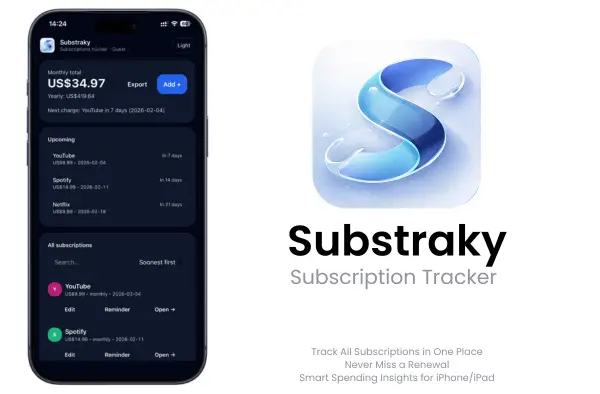
Track subscriptions, renewal dates, and monthly totals in one clean place without linking your bank account.
Substraky helps you stay ahead of recurring charges before they hit. Instead of forgetting trials, missing renewal dates, or losing track of what you pay each month, you get a cleaner way to track subscriptions, set reminders, and stay in control of recurring costs.
No bank login • Monthly total • Calendar reminders • Export list
What Substraky Does (Quick Summary)
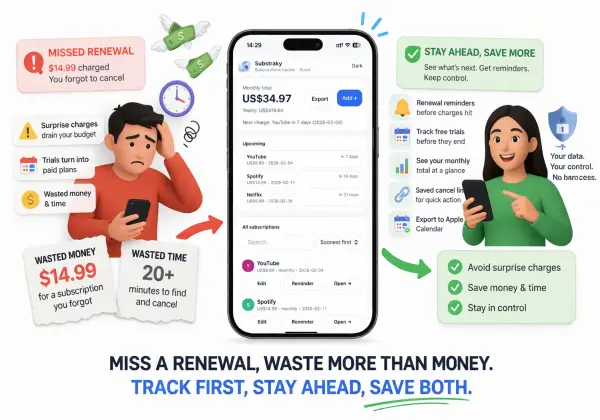
Substraky is a simple subscription tracker that helps you stay ahead of renewals without digging through emails or app settings.
- Add subscriptions with cost + renewal date
- See monthly total and yearly total instantly
- Get reminders before the next renewal
- Export your list (and calendar reminders) when needed
Stop Surprise Renewals Before They Hit
Forgotten subscriptions add up quietly.
A free trial turns into a paid plan. A monthly app renews when you forgot it was still active. A streaming service keeps charging because you meant to cancel it later.
Substraky is built to stop that pattern. It helps you see what is active, what renews next, and what may no longer deserve a place in your budget.
Why Substraky Exists
Substraky gives you a simpler way to manage recurring subscriptions without unnecessary complexity.
What you get
- Active subscriptions list
- Renewal date tracking
- Monthly subscription total
- Free-trial reminders
- Renewal reminders
- Saved cancel links
- Exportable subscription list
- Apple Calendar .ics export
Best for
- Stopping surprise renewals
- Tracking monthly subscription costs
- Remembering free trials before they become paid charges
- Staying organized without linking bank cards or bank accounts
Download Substraky – Subscription Status Checker
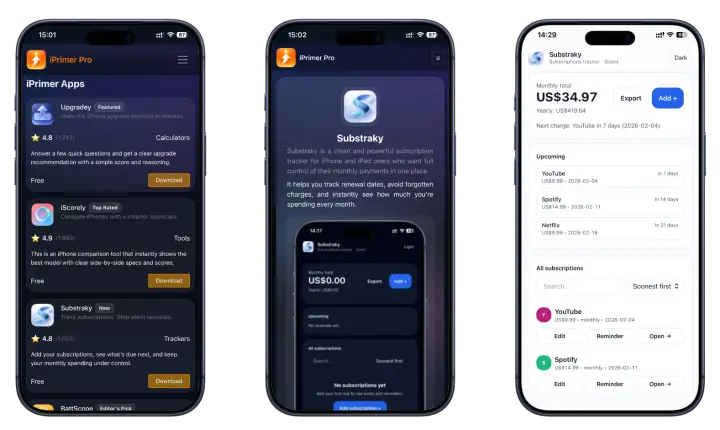
Download Substraky and keep all your subscriptions in one clean list. See your monthly total, get renewal reminders, and avoid surprise charges fast. Open iPrimer, install Substraky, and start tracking in minutes.
• No subscriptions • No jailbreak • No PC • Fast & easy installation
Substraky Compatibility in 2026
Substraky is built to run smoothly on modern iOS devices with a clean, lightweight UI.
- Works on all iPhone and iPad models
- Optimized for iOS 26+
- Compatible support: iOS 17–18
- No PC required • No jailbreak required
Get Substraky Through iPrimer
Substraky is included inside iPrimer, so you get more than a subscription tracker.
What else you get inside iPrimer
👉 BattScope — Battery Health Analyzer
Check whether your iPhone battery is still worth keeping or whether replacement planning makes more sense.
👉 Upgradey — iPhone Upgrade Decision Calculator
Decide whether upgrading now makes sense or whether waiting is the smarter move.
👉 iScorely — iPhone Comparison Tool
Compare iPhones by value, battery, and camera without getting lost in spec overload.
Install Substraky with iPrimer (simple guide)
- Download iPrimer (iPrimer > Read More →)
- Open iPrimer and select Substraky
- Download and Install Substraky app
- Tap Start Tracking and add your subscriptions
- Remove anytime (no jailbreak) – guide →
Track Subscriptions in 60 Seconds
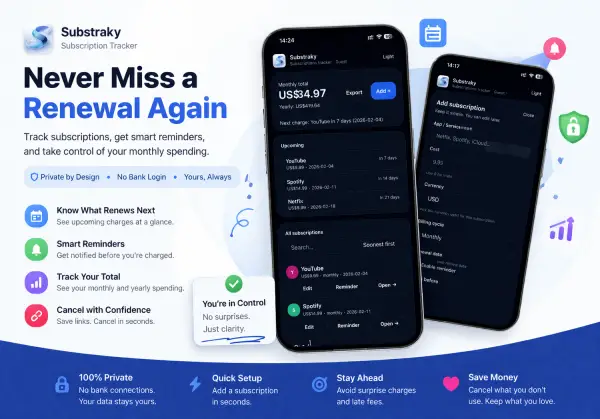
Substraky is designed for quick setup. You can start tracking in a minute and then forget the stress.
Step 1 — Add a subscription
Enter the name, price, billing cycle, and renewal date (example: Netflix, Spotify, YouTube, iCloud).
Step 2 — Turn on reminders
Pick “days before” you want a reminder. Set it once and you’re done.
Step 3 — See totals + upcoming renewals
Substraky shows your monthly subscription total, yearly total, and what’s charging next.
Step 4 — Export anytime
Export your subscription list or add an Apple Calendar subscription reminder so renewals show up where you already look.
Ready to stop surprise renewals? Install Substraky inside iPrimer and add your first subscription.
Key Features of Substraky
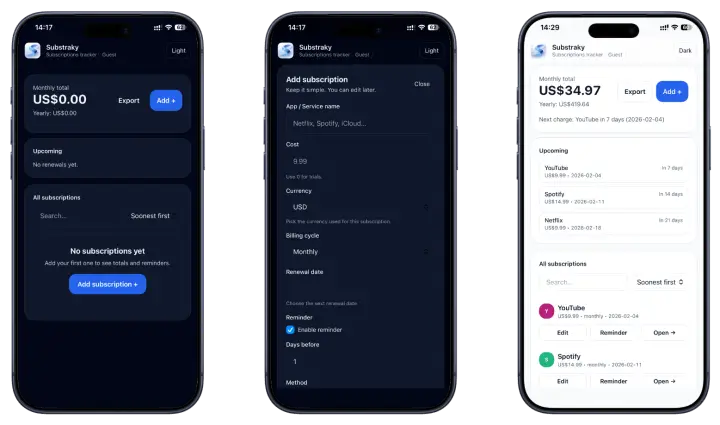
Substraky is built to do the important parts well totals, renewals, reminders, and easy control. No clutter.
👉 Monthly total (and yearly total)
See what you pay per month at a glance, even when some plans renew yearly.
👉 Upcoming renewals list
Know what’s charging next—and when—before it hits your card.
👉 Reminder controls
Choose how many days before you want a reminder. Set it once, stay covered.
👉 Calendar reminders (.ics export)
One tap export to an iOS-friendly calendar reminder file, so renewals show up in Apple Calendar.
👉 Cancel links saved
Store the exact cancel page so it’s never lost when you’re ready to stop a plan.
👉 Export your subscription list
Keep a backup, share a summary, or move your list anytime.
What Makes Substraky Different
A lot of subscription tools try to behave like finance apps. Substraky keeps the job simpler.
👉 No bank login required
You do not need to connect your bank account just to track subscriptions.
👉 No bank cards or sensitive financial details needed
Substraky is built for reminders and visibility, not financial surveillance.
👉 Cleaner subscription visibility
Instead of digging through emails or app settings, you get one place to review what is active.
👉 Saved cancel links
When you are ready to cancel, you do not have to waste time searching for the right page again.
👉 Apple Calendar export
Add another reminder layer for upcoming renewals with .ics export.
Track Subscriptions Without Sharing Financial Details
- No bank card linking
- No bank account access
- No sensitive financial details required
- You stay in control of what you add and track
Substraky is designed for users who want better subscription awareness without giving up privacy.
What You Can Track with Substraky
Substraky works well for any recurring service you want to keep visible.
- Streaming subscriptions
- Music and cloud storage plans
- AI tools and productivity apps
- Creator tools and premium services
- Free trials before they renew
- Any recurring plan you want to monitor
See Your Subscription Costs More Clearly
Renewal reminders help, but visibility matters too.
👉 Monthly total at a glance
See what your active subscriptions are costing you each month.
👉 Upcoming renewals list
Know what is charging next so you are not caught off guard.
👉 One cleaner place for recurring costs
Instead of checking multiple apps, emails, and billing pages, keep the essentials in one simpler system.
Why You Can Trust Substraky
Substraky is built to stay simple, useful, and privacy-focused.
👉 Privacy-first by design
It is built around tracking and reminders, not bank access.
👉 Practical and user-controlled
You can edit, remove, export, or update your tracked subscriptions anytime.
👉 Built for real subscription problems
Substraky is made for users who want to stop surprise charges, manage renewals better, and keep recurring services easier to review.
Substraky Pricing (Free + Lifetime Option)
Substraky is made to be usable without pressure.
👉 Free for basic tracking
Start with core subscription tracking and reminder features.
👉 Optional lifetime access
Upgrade for a stronger long-term subscription management experience.
👉 No forced monthly fee to use the tracker
The goal is to help users control recurring costs, not add more friction.
Substraky Safety, Privacy & Control
Substraky is privacy-first by design.
- No bank login required
- Your subscription data stays private (you can read, edit, or delete it anytime)
- No selling or sharing subscription details
- No system file changes on iPhone or iPad
- Safe install and uninstall via iPrimer
What Is the iPrimer App Store?
iPrimer Productivity Appstore is the main hub where our iOS tools live in one place. Instead of installing separate apps from different sources, you install iPrimer once and then access tools like Substraky directly inside it.
iPrimer vs Substraky (simple difference):
- You get a clean and safe install path for Substraky through iPrimer
- iPrimer = the productivity appstore (the main store + installer hub)
- Substraky = one tool inside iPrimer (your subscription tracker + renewal reminders)
Why this matters for you:
- Updates and access stay organized in one place
- You can add other tools later (battery, upgrade decisions, iPhone comparisons) without hunting for new installs
Substraky FAQ in 2026
1. How do I track subscriptions on iPhone?
Open Substraky and add each subscription with the name, price, billing cycle, and renewal date. After that, Substraky keeps your list organized and shows what’s charging next.
2. How do I stop surprise subscription charges?
Two things prevent surprises: seeing upcoming renewals and getting a reminder before the charge. Add your subscriptions, and the Substraky will warn you ahead of time so you can cancel or downgrade early.
3. Can I track subscriptions without bank login?
Yes. Substraky does not require bank login. You add subscription details yourself, and you stay in control of your data.
4. Can I export my subscriptions to Apple Calendar?
Yes. You can export calendar reminders using an iOS-friendly .ics file, so your renewals can appear in Apple Calendar if you want an extra layer of visibility.
5. How do I track free trials and renewal dates?
Add the trial like a normal subscription and set the renewal date to the day it switches to paid. Then turn on reminders (for example, 1–3 days before) so you have time to cancel.
6. How does Substraky calculate monthly total?
Substraky totals the subscriptions in your list and shows a clear monthly total. If you add yearly plans, Substraky helps you see the overall cost picture alongside your renewals.
7. Can I save cancel links for subscriptions?
Yes. Substraky lets you store the exact cancel page link for each service, so you don’t have to search for it again when it’s time to stop a subscription.
8. Is Substraky free to use?
Yes. Substraky is free to use for basic tracking. If you want unlimited access, you can choose a one-time payment for lifetime option (where available).
9. Is Substraky a subscription app with monthly fees?
No. Substraky is designed to work without forcing a monthly fee. You can use it free, with an optional lifetime upgrade instead of a recurring payment.
10. Is Substraky safe and private?
Yes. Substraky is privacy-first: no bank login, no selling or sharing your subscription data, and no system changes on your iPhone or iPad. Your list is yours to view, edit, export, or delete.
11. Does Substraky work on iPhone and iPad?
Yes. Substraky works on both iPhone and iPad and is optimized for modern iOS versions (iOS 26+), with support for iOS 17–18.
12. How do I uninstall Substraky completely?
If you installed Substraky through iPrimer, remove it using the same standard removal method provided in iPrimer. After uninstalling, your device returns to normal, no jailbreak steps and no system changes required. Substraky uninstall →